
The application directions below are for educators who fall into one of the following categories:
- first-time applications by educators prepared in Wisconsin prior to 9/1/2004; OR
- School speech and language pathologists working under a 1-year SLP license with stipulations who have at least one year of experience in WI and satisfied all stipulations
[PI 34.040(2)(j)]; OR - School social workers working under a 1-year school social worker license with stipulations who have at least one year of experience in WI and satisfied all stipulations [PI 34.040(2)(k)]; OR
- applicants for a JROTC Teaching License; OR
- applicants for the three-year non-renewable Military Spouse license; OR
- School nurse who holds a valid national certification as a school nurse by the National Board for Certification of School Nurses: OR
- School psychologist who holds a valid credential as a Nationally Certified School Psychologist; OR
- you were directed by DPI to complete this application
How to Apply
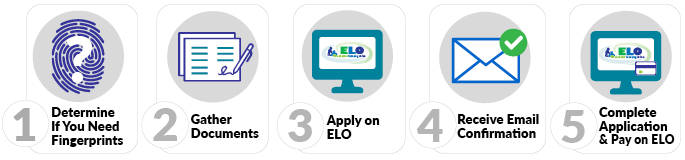
1. Determine if you must submit fingerprints
- Use the fingerprint decision tree to determine if this step is needed. If you have determined that you need fingerprints, submit them electronically via our vendor Fieldprint by following the Electronic Fingerprint Submission directions.
2. Gather Documents
- Preview the ELO Conduct & Competency Questions to see if you will need to provide documentation of any alleged misconduct.
Documentation requirements for your application type:
Educator prepared in
WI prior to 9/1/2004:
WI prior to 9/1/2004:
Obtain a completed PI-1612 Institutional Endorsement and Assurances form
School speech
language pathologist:
language pathologist:
Obtain the PI-1613 Employee Verification form and documentation that verifies the stipulations under
PI 34.040(2)(j) have been addressed
PI 34.040(2)(j) have been addressed
School social worker:
Obtain the PI-1613 Employee Verification form and documentation that verifies the stipulations under
PI 34.040(2)(k) have been addressed
PI 34.040(2)(k) have been addressed
JROTC teaching license:
Obtain a valid JROTC instructor certification from one of the following branches of the military:
- United States Army
- United States Navy
- United States Air Force
- United States Marine Corps
- United States Army
- United States Navy
- United States Air Force
- United States Marine Corps
Military spouse
teaching license:
teaching license:
- Copy of valid license in good standing from another state
- Verification of your spouse’s current military orders AND a copy of either your marriage license OR the military ID card for your spouse.
- If directed by DPI to submit this application, obtain DPI-requested documentation
- Verification of your spouse’s current military orders AND a copy of either your marriage license OR the military ID card for your spouse.
- If directed by DPI to submit this application, obtain DPI-requested documentation
School nurse:
Valid certification from the National Board for Certification of School Nurse
School psychologist:
Valid credential as a Nationally Certified School Psychologist
-
Scan all documentation into files (.pdf, .doc/docx, .jpg/jpeg, or .txt) that are 2MB or less in size
3. Log in to Educator Licensing Online (ELO)
- Within ELO, make sure you have answered the three onboarding questions.
- Find the APPLY FOR A LICENSE section of the Quick Start Menu. Select the same choices in the three drop-downs in the application screenshots based on the type of license you are applying for:
Teacher license:
![field 1: "1-teacher category", field 2: "A-Teacher (including 5-Year Sub) [T001]", field 3: "Teacher: Request New License - Uncommon Request [1031]"](/sites/default/files/imce/licensing/images/T001_1031.jpg)
Administrator license:
![field 1: "2-administrator category", field 2: "A-Administrator (e.g. Superintendent, Principal, etc.) [A001]", field 3: "Administrator: Request New License - Uncommon Request [1031]"](/sites/default/files/imce/licensing/images/A001_1031.jpg)
Pupil Services license:
![field 1: "3-pupil services category", field 2: "A-Pupil Services [P001]", field 3: "Pupil Services: Request New License - Uncommon Request [1031]"](/sites/default/files/imce/licensing/images/P001_1031.jpg)
- Click the “GO!” button.
- Complete each page of the application as instructed. Review your Application Summary and edit information if necessary OR click the “SUBMIT” button to submit your application.
4. Receive Email Confirmation
5. Complete Application on ELO
- Click the GO! button next to “Submit C&C and Payment to Complete Application.”
- Review your fees.
- Complete the Conduct and Competency Questionnaire (14 questions).
- Pay with a credit card or pre-paid card. For fee amounts and additional payment information please see License Application Fees.
PROCESSING TIMES
Our processing times vary throughout the year. For current processing times see the Check Application Status page.